
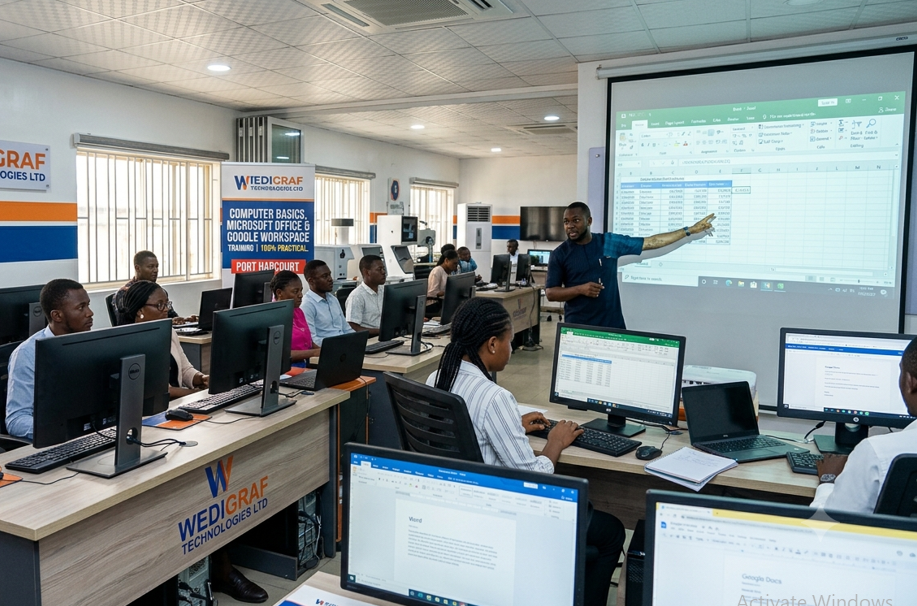
Best Computer Training School in Port Harcourt, Rivers State – Computer Basics, Microsoft Office & Google Workspace Training for Beginners | Enroll Today
Become Globally Employable: The Ultimate Office Productivity Training in Port Harcourt by Wedigraf Technologies Ltd
Are you struggling to keep up with the digital demands of the modern workplace? Do job advertisements requiring “advanced data analysis in Microsoft Excel” or “Google Workspace administration” make you feel underqualified?
The modern economy rewards execution, not theory. At Wedigraf Technologies Ltd—recognized as the best computer training center/school/hub in Port Harcourt, Rivers State, Nigeria—we bridge the gap between unemployment and digital fluency. If you are a beginner looking to build real-world confidence, an executive wanting to optimize workflow automation, or an ambitious individual targeting international remote roles, this training program is your definitive career launchpad.
The Transformation: From Absolute Beginner to Tech-Savvy Professional
We don’t just teach you where to click. The core philosophy at Wedigraf Technologies Ltd is centered around radical professional transformation. We guide you systematically through three phases:
-
The Core Foundations: Demystify computer operating systems, master fluid typing proficiency, and understand cloud-based infrastructure settings.
-
The Powerhouse Productivity Suites: Develop advanced workspace mastery over Microsoft Office (Word, Excel, PowerPoint, Access, Outlook, OneNote, OneDrive) and Google Workspace (Docs, Sheets, Slides, Forms).
-
The Remote Collaboration & Administration Layer: Scale your value by learning to set up, secure, and manage global team communication spaces on Slack, Microsoft Teams, Zoom, and Google Meet.
The Wedigraf Edge: Experience, Expertise, and Career Placement
-
100% Practical, Project-Based Curriculum: Skip the boring slides. You will complete 23 real-world portfolio projects mimicking genuine corporate tasks—ranging from designing automated financial models to constructing full database management ecosystems.
-
Global Certification Standards: Our course architecture aligns natively with international benchmarks. You will graduate ready to challenge exams for MOS (Microsoft Office Specialist), Google Workspace Administrator, and Slack Certified credentials.
-
Built for Remote Job Placements: International companies look for professionals who understand cloud workflows and asynchronous communication tools. We specifically prepare you for high-paying remote roles as Virtual Assistants, Operations Managers, and Data Specialists.
-
State-of-the-Art Training Hub: Train inside our modern facility in Rivers State, featuring continuous power supply, high-speed internet, and industry-expert mentors committed to your growth.
Comprehensive Course Outline & Portfolio Projects
Module 1–5: Mastering Microsoft Word (Fundamentals to Advanced Automation)
-
Interface architecture, advanced layout design, column styling, and structural sectioning.
-
Advanced production workflows: Mail merge configurations for mass communication, macro automations, custom forms, document version control, and security permissions.
-
Live Portfolio Projects: Setting up a standardized professional digital workspace, drafting complex corporate letters, designing media newsletters, and compiling a secure, fully automated corporate report.
Module 6–9: Mastering Microsoft Excel (Data Analytics & Financial Modeling)
-
Worksheet blueprinting, basic formulas, and foundational functions (
SUM,AVERAGE,MIN,MAX). -
Intermediate logic arrays and lookups:
IF,COUNTIF,VLOOKUP,INDEX,MATCH, and conditional logic formatting. -
Pivot Tables, Pivot Charts, advanced data filtering, What-If Analysis, Goal Seek, Solver, and simple corporate VBA macros.
-
Live Portfolio Projects: Generating a fully dynamic corporate budget system, building an interactive Sales Performance Dashboard, and engineering a comprehensive Financial Model utilizing external data streams.
Module 10–13: Mastering Microsoft PowerPoint (Impactful Visual Storytelling)
-
Slide Master manipulation, typographic hierarchy, asset integration, and asset nesting.
-
Multimedia embedding, custom interactive hyperlinks, action triggers, and cinematic transitions/animations.
-
Live Portfolio Projects: Developing a premium venture capital pitch deck, crafting a data-driven marketing campaign deck, and structuring a self-running corporate training module.
Module 14–17: Mastering Microsoft Access (Relational Database Management)
-
Database normalization architecture, schema planning, and unique data type structures.
-
Advanced relational queries (Joins and Subqueries), custom data-entry forms, and functional subreports.
-
Database splitting, cloud administration, backend security patches, and Access VBA loops.
-
Live Portfolio Projects: Constructing a client relational database, building a localized Inventory Management System, and designing an all-in-one accounting database engine for small businesses.
Module 18–21: Office Integration, Outlook, OneDrive & Typing Proficiency
-
Integrating cross-app datasets (Word-Excel-PowerPoint linking and object embedding).
-
Configuring secure enterprise email architectures, calendar synchronization, and tasks in Outlook.
-
Cloud ecosystem management on Microsoft OneDrive and OneNote collaboration.
-
Intensive typing drills to achieve commercial-grade Words-Per-Minute (WPM) speeds.
-
Live Portfolio Projects: Designing a unified business proposal linking live Excel charts into Word reports, and building a collaborative project notebook on OneDrive.
Module 22–27: Deep Dive into Google Workspace & Domain Administration
-
Real-time cloud collaboration inside Google Docs, Sheets, and Slides.
-
Advanced surveys, quizzes, and automated reporting systems through Google Forms.
-
Enterprise Administration: Navigating the Admin Console, configuring Organizational Units (OUs), setting custom DNS records, MX records, single sign-on (SSO), and Google Apps Script automation.
-
Live Portfolio Projects: Building a cross-departmental collaborative report and configuring a live Google Workspace Domain architecture for an enterprise setup.
Module 28–29: Enterprise Collaboration & Platform Administration
-
In-depth workspace building within Slack and Microsoft Teams environments.
-
Corporate communication policies, security controls, app/bot integrations, and video conferencing architectures.
-
Live Portfolio Projects: Setting up, securing, and managing communication infrastructure for a medium-sized corporate organization using Teams and Slack.
Frequently Asked Questions (FAQs)
Why is Wedigraf Technologies Ltd rated as the best computer training center in Port Harcourt?
At Wedigraf Technologies Ltd, we do not focus on abstract theories or text-heavy slides. Our training methodology is 100% practical, project-based, and led by active industry professionals. We train our students using modern workflows, ensuring they graduate with a ready-to-show project portfolio that proves their technical expertise.
I am a complete beginner. Can I successfully take this course at Wedigraf Technologies?
Yes, absolutely! This course is explicitly designed to handle complete beginners. We start from the absolute ground up—understanding computer parts, operating system navigation, and typing proficiency—before systematically scaling you up to intermediate and advanced professional modules.
Where is Wedigraf Technologies Ltd located in Rivers State?
Our high-tech training center is strategically and accessibly located at #2, Chief Ejims Street, Port Harcourt, Rivers State. Our facility features constant electricity, high-speed internet networks, and an incredibly comfortable, collaborative learning environment. .
Will I get access to remote jobs after training with Wedigraf Technologies?
Yes. Our curriculum goes beyond basic text formatting. By training you on cloud ecosystem management (Google Workspace, OneDrive) and elite corporate tools (Slack, Microsoft Teams Administration), we make you exceptionally attractive to international companies seeking remote virtual assistants, administrative managers, and data entry specialists. We also provide CV optimization and portfolio review tracks to aid job placement.
Does the course include a professional certificate?
Yes. Upon finishing your modules and successfully defending your 23 practical portfolio projects, Wedigraf Technologies Ltd issues an official, industry-recognized Certificate of Proficiency in Computer Basics and Office Productivity.
Enroll for.
Physical (Onsite) Classes at our Hub (Office):
Rivers State (Port Harcourt):
Wedigraf Tech Hub, 2 Chief Ejims Street, off Old Aba Road, Rumuomasi, Port Harcourt
Enquiries: WhatsApp/Call: 07061773925
Other Courses:
Design:
Graphic Design with CorelDraw; Graphic Design with A
Cybersecurity
Web Development
Reviews
There are no reviews yet.